
ClubRunner Nova – Documents & Images
Storage, governance, and a recommended folder structure
District 9675 – club-level resource
ClubRunner Nova provides secure, centralised storage for your club’s documents and images. Using it well keeps records organised, supports leadership transition, and makes it easy for members to find what they need.
Quick tip
If you can’t find something, contact the club Secretary or ClubRunner Administrator. Many files are stored under Documents/Resources in the Member Area.
How Documents & Images Work in ClubRunner Nova
Upload
Admins upload files to
Documents or Image Library
Stored Securely
Files are organised in folders with role-based access
Displayed
Linked to custom pages, news stories, events or emails
One central system → Organised records → Smooth leadership transition
📁 Documents / Resources
Use the Documents/Resources area to store and organise important club files, such as minutes, policies, forms and project records.
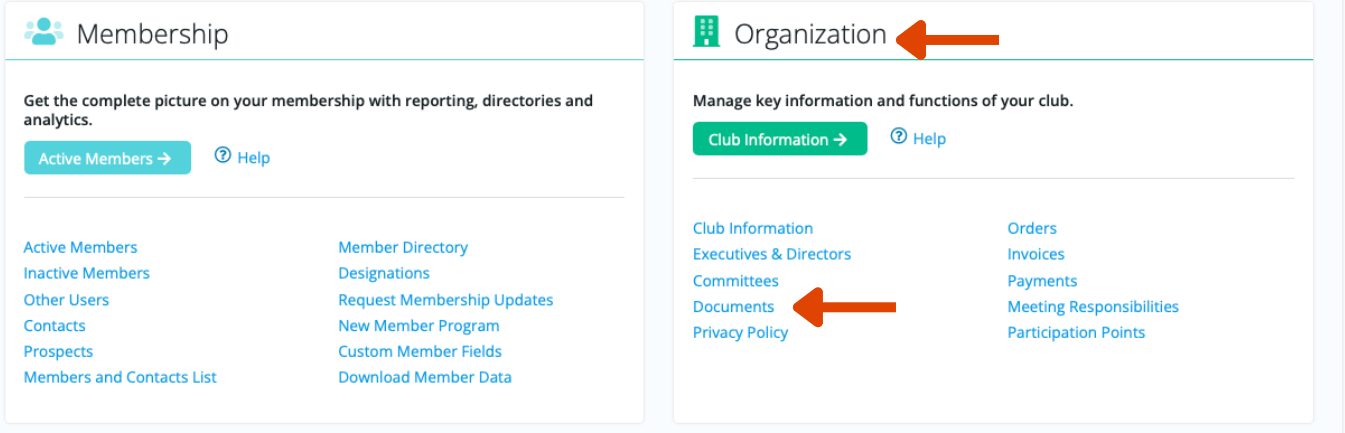
More information - How to view Club Documents.
Common document types
Meeting minutes and agendas
Policies and procedures
Forms and templates
Strategic plans and reports
Event and project documentation
Documents best practice
Use clear folder names (e.g. Board Minutes 2025–26)
Upload final versions (avoid drafts)
Name files consistently: YYYY-MM + document type
Archive older material annually
🖼 Image Library
The Image Library stores images used across your website pages, news stories, custom pages and event promotions. Uploading images once helps prevent broken links and supports consistent branding. Find out about the difference between My Images and Admin. Also how to use the image library.
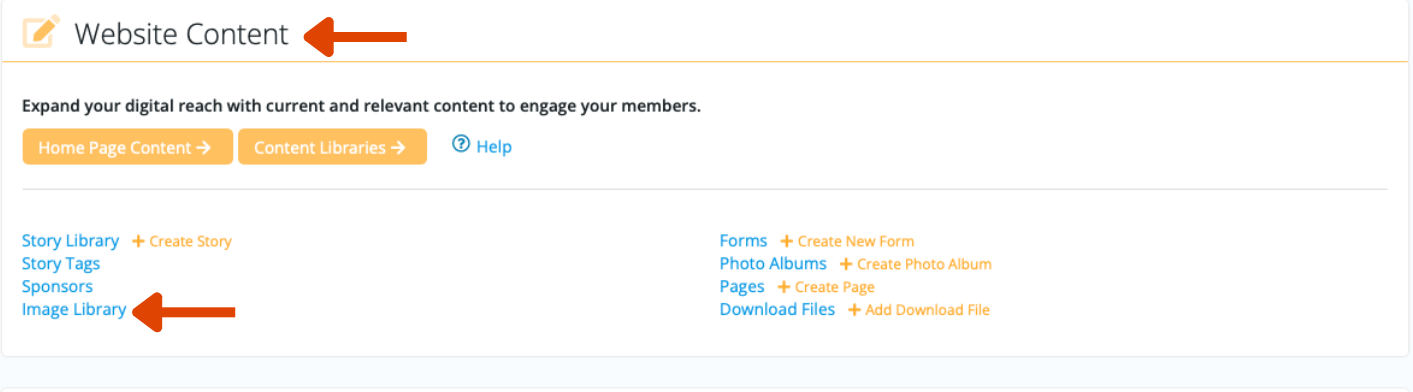
Images are used for
Website banners and page images
Event promotions and flyers
News stories and updates
Club logos and brand assets
Images best practice
Resize large images before upload
Create folders (e.g. Logos, Events, News)
Avoid duplicate uploads
Use descriptive filenames (e.g. Farm_OpenDay_2026.jpg)
🏛 Board-Level Governance
Good document management is part of club governance. The Board should ensure key records are stored securely, access is appropriate, and processes support smooth leadership transition.
Governance responsibilities
Ensure minutes are approved and uploaded promptly
Restrict sensitive folders (Board-only, Financial, HR)
Maintain compliance records securely
Review and archive folders annually
Assign a responsible officer for document oversight
Risk management considerations
Avoid storing official club records in personal email accounts or personal drives
Document leadership transition access (who holds admin access and how it is transferred)
Review role-based permissions regularly
🗂 Recommended Document Structure Template
A simple numbered folder structure helps keep files ordered and consistent year-to-year. Use (or adapt) the template below.
Top-level folders
01 Governance & Policies
02 Board Minutes
03 Club Minutes
04 Financial Records (Restricted)
05 Strategic Planning
06 Events & Projects
07 Forms & Templates
08 Archived Years
Suggested file naming
YYYY-MM Board Minutes.pdf
YYYY-MM Club Minutes.pdf
YYYY Policy – Code of Conduct.pdf
YYYY Event – Movie Night Run Sheet.docx
🔄 How it all fits together
Upload
Admins/officers upload to
Documents or Image Library
Stored securely
Folders + role-based access
keep records protected
Used everywhere
Linked to pages, events,
news, and communications